
Organise the information
Libraries, metadata and useful views give shared documents context.
Microsoft & Power Platform
Bring documents, people and processes closer together. Explore how Microsoft 365, SharePoint, Power Platform and Copilot can support better information and more connected work—with the business requirement first.
A connected Microsoft environment

Documents, collaboration and shared knowledge

Applications, approvals and connected processes

Find, summarise and work with useful context
Built around your people, information and permissions.
Microsoft 365 & SharePoint
Microsoft 365 brings familiar collaboration tools together. SharePoint provides shared sites, document libraries and lists that can give that work structure.
The opportunity is more than putting files online: make information easier to find, define how teams work with it and connect it to the next action.
Libraries, metadata and useful views give shared documents context.
Version history and review arrangements help teams manage changes.
Permissions, ownership and retention need deliberate decisions.
Start with the working reality. Where do files arrive? Which team owns them? What should happen after a document is uploaded or a record changes? These questions shape the solution.
Explore information managementMicrosoft Power Platform
Power Platform brings low-code applications, automation and data tools together. Power Automate and Power Apps offer two complementary starting points.

Connect triggers, actions and decisions across supported services. Route requests, chase an approval or update a record without repeating every step by hand.

Create focused business applications around the information people need to enter, review or act on. Bring a defined task into a more consistent working experience.
Connector availability, licences, permissions, data policies and support ownership need checking for each solution. An available connector is not, by itself, a complete integration.
Inside Microsoft Power Automate
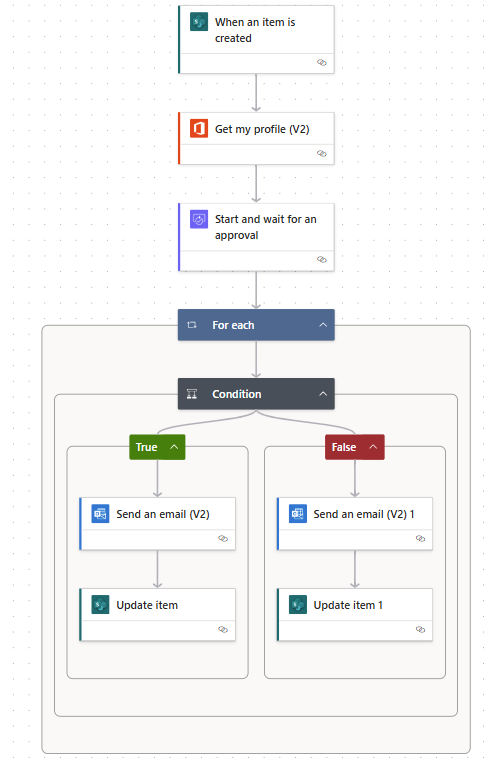
This genuine Microsoft example starts with a SharePoint list item, requests approval, then sends an email and updates the item according to the decision.
It illustrates the software—not a completed Ascentas customer project. The exact interface and available actions depend on your environment.
Screenshot © Microsoft. Used with permission from Microsoft. Microsoft’s approval-workflow example.
Microsoft 365 Copilot
Microsoft 365 Copilot can help people find information, summarise content and prepare drafts in supported Microsoft experiences. Available work context depends on the product, licence and the information a user is allowed to access.
It does not repair unclear permissions or make unreliable source documents trustworthy. Information readiness matters just as much as choosing an AI tool.
Current, well-organised documents with clear owners and a purpose.
Review sharing and permissions before making information easier to discover.
Check responses and sources, especially when the result informs an important decision.
Microsoft 365 Copilot supports people in their work. Microsoft Copilot Studio is a tool for building and managing agents. A custom agent needs a separately defined use case, permissions, evaluation and support plan—not simply a Copilot licence.
Working with Ascentas
Ascentas brings an information, automation and integration perspective to the conversation. Begin with the records you manage, the work that slows people down and the systems that need to connect.
The proposed scope, technical fit and delivery responsibilities are agreed after reviewing your environment. Product availability alone does not determine the right solution.
Discuss structure, access, ownership and the information people need to retrieve.
Information managementMap the decisions, exceptions and people involved before designing the workflow.
Discuss a processIdentify which system owns the information and how an exchange could work reliably.
Discuss an integrationAlready using Laserfiche? Microsoft services may complement your existing environment. Review the responsibilities of each platform before duplicating repositories or processes. Explore Laserfiche.
Product features and licensing change. Scope and availability should be confirmed against the current environment. Microsoft, Microsoft 365, SharePoint, Power Automate, Power Apps and Copilot are trademarks of the Microsoft group of companies. No Microsoft certification or endorsement is implied.